
CRM configuration: Activities
Customise the activity subtypes that show up across base bont — call, email, meeting, mail, SMS, LinkedIn, WhatsApp, task — plus any you add yourself.
Activity subtypes are the kinds of interaction bont can log. The standard set covers the most common channels (call, email, meeting, task) but you can rename, reorder or add new ones to match how your team actually works.
Open it
Settings → App Settings → CRM configuration → Activities.
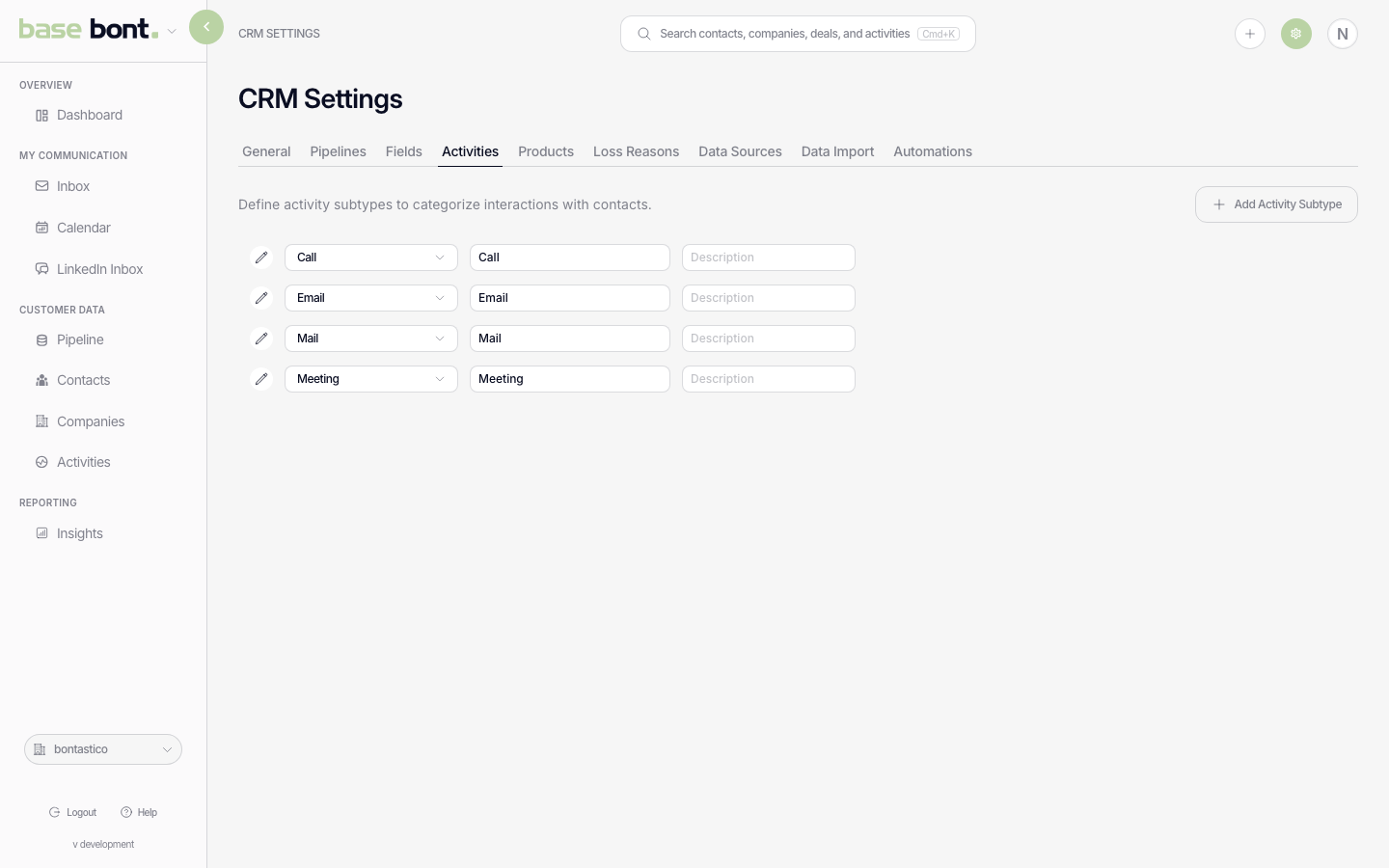
What you can change
- Rename — click the row to edit the label. The change applies everywhere (Activities list, contact timelines, the Add Activity modal).
- Reorder — drag the row up or down. The order controls where the subtype shows up in the type picker.
- Icon — pick from the icon set to make the type easier to scan in the feed.
- Delete — trash icon. Activities of the deleted subtype stay on records but convert to "Other".
- + Add — introduce a new subtype (e.g. "Demo", "Workshop"). Pick the underlying behaviour (logged interaction vs. task) and the icon.
Required configuration
Each subtype has a behaviour mode:
- Logged interaction — past event with an event-timestamp (Call, Email, Meeting, SMS, LinkedIn).
- Task — future obligation with a due date (Task, scheduled callbacks).